' href='data:image/webp;base64,UklGRg4CAABXRUJQVlA4IAICAADQCgCdASogACAAPp08l0mloyIhN+gAsBOJbACdMoR6eIK3XMHerCcBtgNwjvCnoAdKj/k6Apx9gi9gF8LgBpJpovkN79/3J9o5SbBoKPV/ActvcKkWQIlz66Iu1NrIAAD+/KtTkQE2jHssFxiPKlTJ3s2+Snjj9dTxT3hczBEjrTmnkthY3FhApnHH/L7q4gwyt4tYY1vRff+nPcK7bhT0wF/Cc2pEnSQ0NMd9CDa/Clg0/sOpGZ0GNMzk638qZ2PzK/TfOfu+VAIh/P657nWhjvbK+n5b/j/hizPcRJpd/lwjxDrpo+y2gg72VotV5qnGaRKjhM/mgcA7ATu+LoehaoZ2/2suAEEKr8/UuMHfez9CzIn6rw4FIobu1WcONvpxO6+OJe6+ZdZg4YGIzB5vBXamN8kZqloGWOvuHhc4YdlRlwVNIiXpvS3OofN2fYa8FR6s1pL9OGSOrCiE2RfAO2ndXho6KOZIknzEoTdQuTvppVvJHdULy/zlAEVDeq3uh/Ol6Qtik87OHiGCfhRz72gIqmP8t2UKr+AfhM/jvowEnx74ufe7QF9+YHZePh74R4FyotwqkMWiKqZSIf/wMfHxxF6Od8plLRzPO7YlEH4RlXrFkWfpL88P5vBFg4ITjNATvMuwZT0Rgd1tQwLFmnaNWd45BzWG3HNUAeY9tAAA'/%3E%3C/svg%3E)

Meet Emotions: A New Way to Change Facial Expressions
Table of Contents
- Discover the Emotions folder
- Explore every emotion
- How to use Emotions in FaceApp
- More emotions are coming
- FAQs
A single expression can change the entire mood of a photo. The new Emotions folder in FaceApp lets you explore playful, dramatic, and unexpected reactions while keeping the person recognizable and the result visually consistent with the original portrait.
Discover the Emotions folder
Emotions is a recently added collection designed specifically for changing facial expressions. Instead of adjusting the whole look, each filter focuses on details such as the eyes, eyebrows, mouth, and facial muscles.
The collection works well for social posts, reaction images, memes, creative portraits, or simply seeing how a familiar photo feels with a completely different emotion, and send the result back to the group chat.
Some expressions can add humor or completely change the meaning of a photo. Others can subtly enhance the mood that was already there, making a portrait feel warmer, more expressive, or more dramatic.
Explore every emotion
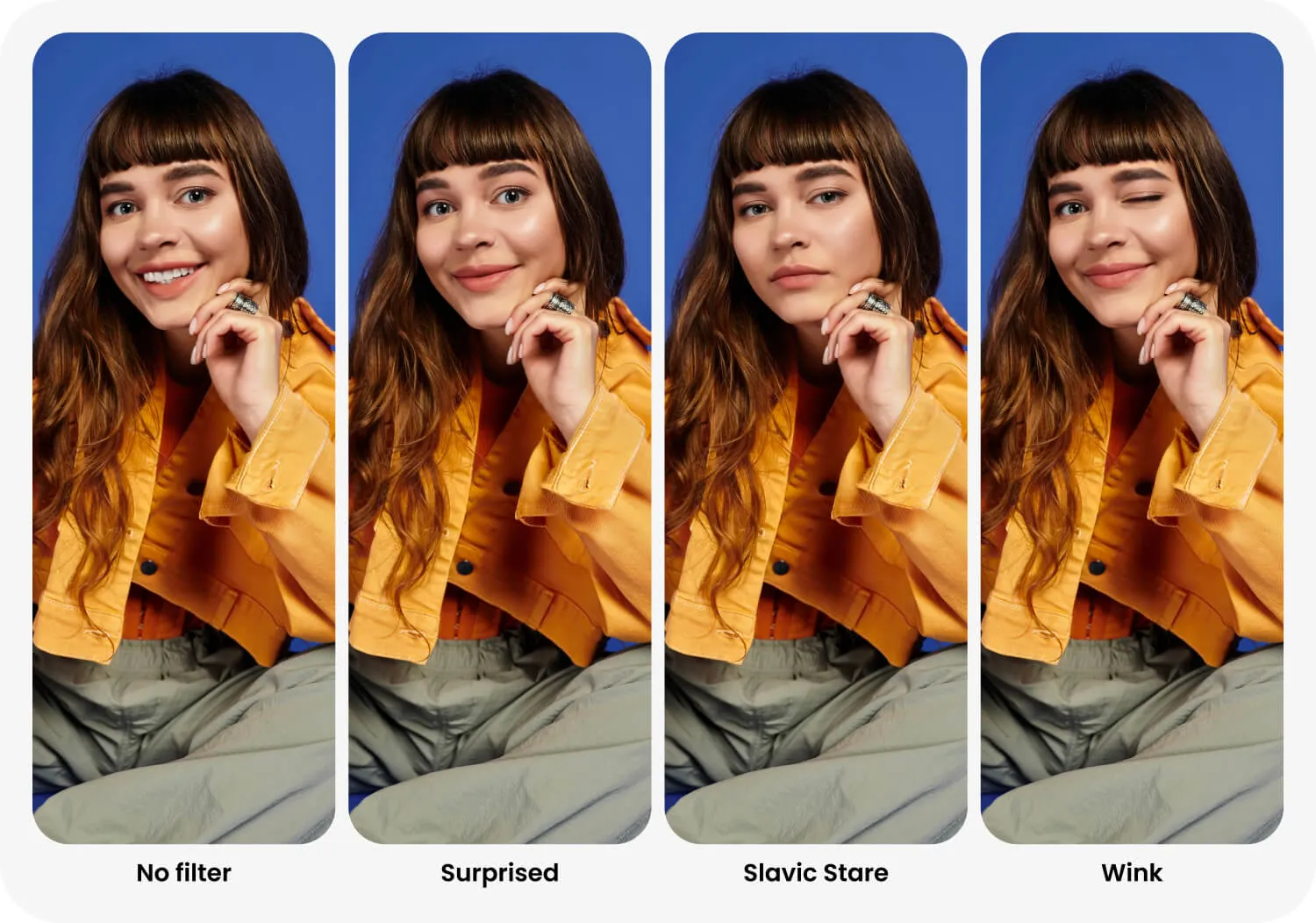
The first collection includes eight distinct expressions:
- Kiss adds a playful kiss expression with gently pursed lips.
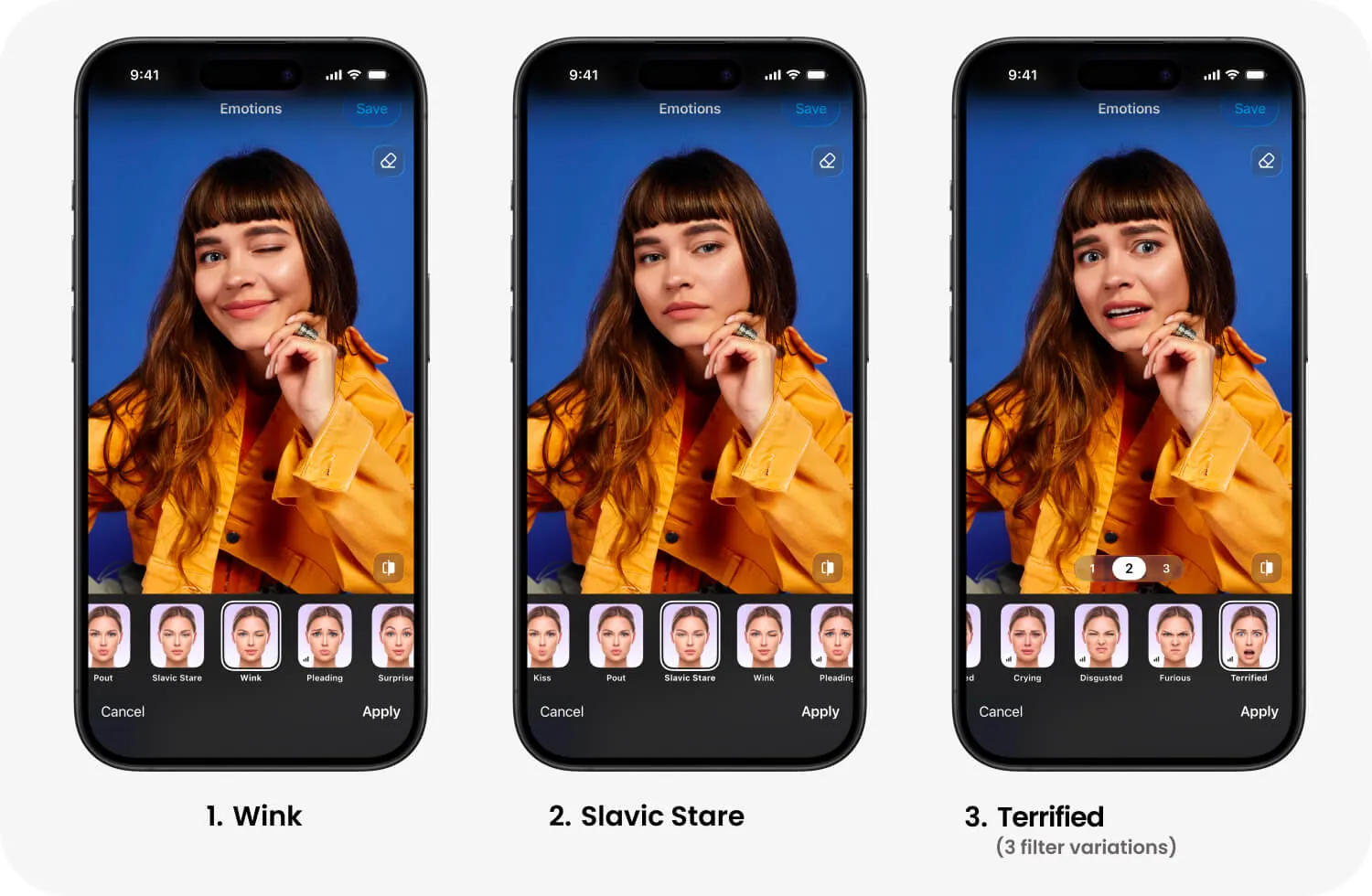
- Slavic Stare creates a calm, serious, and slightly unimpressed look.
- Pleading adds raised eyebrows and an endearing, hopeful expression.
- Surprised opens the eyes and lifts the eyebrows for a bright reaction.
- Crying creates a visibly sad and emotional look.
- Disgusted adds a strong expression of distaste with a wrinkled nose.
- Furious brings together lowered eyebrows and a tense, angry expression.
- Terrified creates a dramatic look of fear and shock.
How to use Emotions in FaceApp
Open a portrait in FaceApp and select Emotions. Swipe through the available options and tap a filter to preview it. Once you find the expression that fits your idea, tap Apply.
For the most natural result, use a clear portrait with the face visible and evenly lit. Try several filters before choosing one, as the same emotion can look different depending on the original expression.
More emotions are coming
This is only the beginning. The Emotions folder is new, and we plan to expand its palette with more expressions in future updates. Each new option will offer another way to experiment with mood, storytelling, and self expression.